Ground
Definition
The Ground element represents the Earth as an infinite perfectly-conductive plane. Connections to the ground can be
made with ideal or impedant connections using the GroundConnection element. Lines with shunt admittances require a
Ground element for their shunt connections. The symbols of Ground and GroundConnection elements are the following:
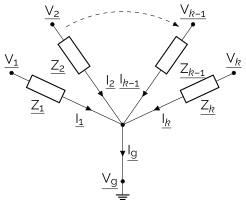
Ground adds the equation \(\underline{I_{\mathrm{g}}} = 0\), where \(\underline{I_{\mathrm{g}}}\) is the sum of the
currents of all elements connected to the ground. GroundConnection adds the equation
\(\underline{V} - \underline{V_{\mathrm{g}}} = \underline{Z} \cdot \underline{I}\), where \(\underline{V}\) is the potential
of the terminal element connected to the ground, \(\underline{V_{\mathrm{g}}}\) is the potential of the ground,
\(\underline{I}\) is the current flowing through the ground connection towards the ground and \(\underline{Z}\) is the
impedance of the ground connection.
Warning
In electrical engineering, it is common to also add the equation \(\underline{V_{\mathrm{g}}}=0\) when
defining a ground element. If you want to do so, you must add a PotentialRef element as defined in
Potential Reference.
Available Results
The following results are available for a Ground element:
Result Accessor |
Default Unit |
Type |
Description |
|---|---|---|---|
|
\(V\) |
complex |
The potential of the ground |
and the following results are available for a GroundConnection element:
Result Accessor |
Default Unit |
Type |
Description |
|---|---|---|---|
|
\(A\) |
complex |
The current flowing through the ground connection |
Usage
In Roseau Load Flow, a Ground element is used with:
A line with shunt components (i.e,
y_shuntinLineParametersis non-zero).A ground connection (using the
GroundConnectionelement) to connect a phase of a bus or other terminal elements to the ground.A potential reference (using the
PotentialRefelement) to set the potential of the ground to 0V.
import functools as ft
import numpy as np
import roseau.load_flow as rlf

# Define the ground element
gnd = rlf.Ground(id="Gnd")

# Define two buses
bus1 = rlf.Bus(id="Bus1", phases="abcn")
bus2 = rlf.Bus(id="Bus2", phases="abcn")

# Define a voltage source on bus1
vs = rlf.VoltageSource(id="Src", bus=bus1, voltages=rlf.Q_(230, "V"))

# Define the parameters of the lines
lp = rlf.LineParameters(
    id="LP",
    z_line=rlf.Q_((0.12 + 0.1j) * np.eye(4), "ohm/km"),
    y_shunt=rlf.Q_(2e-4j * np.eye(4), "S/km"),
)

# Define a line between bus1 and bus2 (using gnd for the shunt connections)
line = rlf.Line(
    id="Line",
    bus1=bus1,
    bus2=bus2,
    parameters=lp,
    length=rlf.Q_(2, "km"),
    ground=gnd,
)

# Add an unbalanced load on bus2
load = rlf.PowerLoad(id="Load", bus=bus2, powers=rlf.Q_([5.0, 2.5, 0], "kVA"))

# Connect the neutral of bus1 to the ground
gc = rlf.GroundConnection(id="GC", ground=gnd, element=bus1, phase="n")

# Set the potential of the ground element gnd to 0V
pref = rlf.PotentialRef(id="PRef", element=gnd)

# Create a network and solve a load flow
en = rlf.ElectricalNetwork.from_element(bus1)
en.solve_load_flow()

# The potential of gnd is 0V as defined by the potential reference element
en.res_grounds.transform([np.abs, ft.partial(np.angle, deg=True)])
# | ground_id   |   ('potential', 'absolute') |   ('potential', 'angle') |
# |:------------|----------------------------:|-------------------------:|
# | Gnd         |                           0 |                        0 |

# The potential of the neutral of bus1 is 0V as well
en.res_buses.transform([np.abs, ft.partial(np.angle, deg=True)])
# |               |   ('potential', 'absolute') |   ('potential', 'angle') |
# |:--------------|----------------------------:|-------------------------:|
# | ('Bus1', 'a') |                         230 |                        0 |
# | ('Bus1', 'b') |                         230 |                     -120 |
# | ('Bus1', 'c') |                         230 |                      120 |
# | ('Bus1', 'n') |                           0 |                  21.4768 |
# | ('Bus2', 'a') |                     224.443 |                 -1.13582 |
# | ('Bus2', 'b') |                     227.364 |                 -120.528 |
# | ('Bus2', 'c') |                     230.009 |                  119.997 |
# | ('Bus2', 'n') |                     6.18435 |                  10.2185 |

# Very small current flows through the ground connection as only the shunt admittances
# of the line are connected to the ground
en.res_ground_connections.transform([np.abs, ft.partial(np.angle, deg=True)])
# | connection_id   |   ('current', 'absolute') |   ('current', 'angle') |
# |:----------------|--------------------------:|-----------------------:|
# | GC              |               4.35309e-14 |                 155.81 |

# Now connect the neutral of bus2 to the ground with a 1Ω impedance
gc2 = rlf.GroundConnection(id="GC2", ground=gnd, element=bus2, phase="n", impedance=1)
en.solve_load_flow()

# Now more current flows through the ground connections
en.res_ground_connections.transform([np.abs, ft.partial(np.angle, deg=True)])
# | connection_id   |   ('current', 'absolute') |   ('current', 'angle') |
# |:----------------|--------------------------:|-----------------------:|
# | GC              |                   4.88787 |               -179.052 |
# | GC2             |                   4.88767 |               0.950372 |

# The sum of all currents flowing to the ground is still zero as expected
abs(
    sum(line.side1.res_shunt_currents.m)
    + sum(line.side2.res_shunt_currents.m)
    + gc.res_current.m
    + gc2.res_current.m
)
# 0

# The potential of the neutral of bus2 is now closer to 0V as it is connected
# to the ground with a 1Ω impedance
en.res_buses.transform([np.abs, ft.partial(np.angle, deg=True)])
# |               |   ('potential', 'absolute') |   ('potential', 'angle') |
# |:--------------|----------------------------:|-------------------------:|
# | ('Bus1', 'a') |                         230 |                        0 |
# | ('Bus1', 'b') |                         230 |                     -120 |
# | ('Bus1', 'c') |                         230 |                      120 |
# | ('Bus1', 'n') |                           0 |                  8.94368 |
# | ('Bus2', 'a') |                     224.496 |                 -1.13599 |
# | ('Bus2', 'b') |                     227.351 |                 -120.533 |
# | ('Bus2', 'c') |                     230.009 |                  119.997 |
# | ('Bus2', 'n') |                     4.88767 |                 0.950372 |
Advanced Usage
In Roseau Load Flow, several grounds can be defined to represent separate Earth references. You almost never need to
do that but in case you do, create multiple Ground elements and use them independently in the GroundConnection and
Line elements.
API Reference
- class Ground(id)
A ground element represents the earth in the network.
The ground itself is modeled as an ideal infinite plane. The ground potential is NOT assumed to be zero unless explicitly set with a
PotentialRefelement.Grounds have two main usages:
To connect shunt components of a line. A line with shunt components requires a ground element to be passed to its constructor.
To connect terminal elements (buses, sources and loads) and branch elements (lines, switches and transformers) via a
GroundConnection. These connections can be ideal (zero impedance) or impedant (non-zero impedance).
Ground constructor.
- Parameters:
id (Id) – A unique ID of the ground in the network grounds.
- element_type: Final = 'ground'
The type of the element. It is a string like
"load"or"line"etc.
- allowed_phases: Final
The allowed phases for this element type.
It is a frozen set of strings like
"abc"or"an"etc. The order of the phases is important. For a full list of supported phases, useprint(<Element class>.allowed_phases).
- property connections: list[GroundConnection]
The connections to the ground.
- Return type:
- connect(bus, phase='n')
Connect the ground to a bus on the given phase.
Deprecated since version 0.12.0: Use the
GroundConnectionclass instead. It is more flexible and provides more features including non-ideal (impedant) connections.
- is_multi_phase: Final = True
Is the object multi-phase?
- property network: _N_co | None
Return the network the element belong to (if any).
- Return type:
_N_co | None
- id
- to_dict(*, include_results=True)
Convert the element to a dictionary.
- to_json(path, *, include_results=True, indent=True)
Save this element to a JSON file.
Warning
If the file exists, it will be overwritten.
- Parameters:
path (StrPath) – The path to the output file to write the network to.
include_results (bool) – If True (default), the results of the load flow are included in the JSON file. If no results are available, this option is ignored.
indent (bool) – If True (default), the JSON output is pretty-printed with 2-space indentation. Set to False for compact output.
- Returns:
The expanded and resolved path of the written file.
- Return type:
- results_to_dict(full=False)
Return the results of the element as a dictionary.
The results dictionary of an element contains the ID of the element, its phases, and the result. For example, bus.results_to_dict() returns a dictionary with the form:
{"id": "bus1", "phases": "an", "potentials": [[230.0, 0.0], [0.0, 0.0]]}
Note that complex values (like potentials in the example above) are stored as list of [real part, imaginary part] so that it is JSON-serializable
Using the full argument, bus.results_to_dict(full=True) leads to the following results:
{"id": "bus1", "phases": "an", "potentials": [[230.0, 0.0], [0.0, 0.0]], "voltages": [[230.0, 0.0]]}
The results dictionary of the network contains the results of all of its elements grouped by the element type. It has the form:
{
    "buses": [bus1_dict, bus2_dict, ...],
    "lines": [line1_dict, line2_dict, ...],
    "transformers": [transformer1_dict, transformer2_dict, ...],
    "switches": [switch1_dict, switch2_dict, ...],
    "loads": [load1_dict, load2_dict, ...],
    "sources": [source1_dict, source2_dict, ...],
    "grounds": [ground1_dict, ground2_dict, ...],
    "potential_refs": [p_ref1_dict, p_ref2_dict, ...],
}
where each dict is produced by the element’s results_to_dict() method.
- results_to_json(path, *, full=False, indent=True)
Write the results of the load flow to a json file.
Warning
If the file exists, it will be overwritten.
- Parameters:
path (StrPath) – The path to the output file to write the results to.
full (bool) – If True, all the results are added in the resulting dictionary, including results computed from other results (such as voltages that could be computed from potentials). False by default.
indent (bool) – If True (default), the JSON output is pretty-printed with 2-space indentation. Set to False for compact output.
- Returns:
The expanded and resolved path of the written file.
- Return type:
- class GroundConnection(id=None, *, ground, element, impedance=0j, phase='n', on_connected='raise')
An ideal or impedant connection to the ground.
Ground connection constructor.
- Parameters:
id (Id | None) – A unique ID of the ground connection in the network. If not provided, it will be generated roughly as {element.id} {(side) or ‘’} phase {phase} to {ground.id}.
ground (Ground) – The ground object to connect to.
element (AbstractTerminal) – The terminal element to connect to the ground. This can be a bus, source, load, or a branch side.
impedance (Complex | Q_[Complex]) – The impedance of the connection to the ground (ohm). Defaults to 0.
phase (str) – The phase of the connection. It must be one of
{"a", "b", "c", "n"}. Defaults to"n".on_connected (Literal['raise', 'warn', 'ignore']) – The action to take if other phases of the element are already connected to this ground. If
"raise"(default), raise an error. If"warn", issue a warning. If"ignore", do nothing. An error is always raised if the passed phase of the element is already connected to this ground.
- element_type: Final = 'ground connection'
The type of the element. It is a string like
"load"or"line"etc.
- allowed_phases: Final
The allowed phases for this element type.
It is a frozen set of strings like
"abc"or"an"etc. The order of the phases is important. For a full list of supported phases, useprint(<Element class>.allowed_phases).
- on_connected: Literal['raise', 'warn', 'ignore'] = 'raise'
- property is_disconnected: bool
Is this ground connection disconnected from the network?
- Return type:
- property res_current: Q_[complex]
The load flow result of the current flowing through this connection to the ground (A).
- is_multi_phase: Final = True
Is the object multi-phase?
- property network: _N_co | None
Return the network the element belong to (if any).
- Return type:
_N_co | None
- id
- to_dict(*, include_results=True)
Convert the element to a dictionary.
- to_json(path, *, include_results=True, indent=True)
Save this element to a JSON file.
Warning
If the file exists, it will be overwritten.
- Parameters:
path (StrPath) – The path to the output file to write the network to.
include_results (bool) – If True (default), the results of the load flow are included in the JSON file. If no results are available, this option is ignored.
indent (bool) – If True (default), the JSON output is pretty-printed with 2-space indentation. Set to False for compact output.
- Returns:
The expanded and resolved path of the written file.
- Return type:
- results_to_dict(full=False)
Return the results of the element as a dictionary.
The results dictionary of an element contains the ID of the element, its phases, and the result. For example, bus.results_to_dict() returns a dictionary with the form:
{"id": "bus1", "phases": "an", "potentials": [[230.0, 0.0], [0.0, 0.0]]}
Note that complex values (like potentials in the example above) are stored as list of [real part, imaginary part] so that it is JSON-serializable
Using the full argument, bus.results_to_dict(full=True) leads to the following results:
{"id": "bus1", "phases": "an", "potentials": [[230.0, 0.0], [0.0, 0.0]], "voltages": [[230.0, 0.0]]}
The results dictionary of the network contains the results of all of its elements grouped by the element type. It has the form:
{
    "buses": [bus1_dict, bus2_dict, ...],
    "lines": [line1_dict, line2_dict, ...],
    "transformers": [transformer1_dict, transformer2_dict, ...],
    "switches": [switch1_dict, switch2_dict, ...],
    "loads": [load1_dict, load2_dict, ...],
    "sources": [source1_dict, source2_dict, ...],
    "grounds": [ground1_dict, ground2_dict, ...],
    "potential_refs": [p_ref1_dict, p_ref2_dict, ...],
}
where each dict is produced by the element’s results_to_dict() method.
- results_to_json(path, *, full=False, indent=True)
Write the results of the load flow to a json file.
Warning
If the file exists, it will be overwritten.
- Parameters:
path (StrPath) – The path to the output file to write the results to.
full (bool) – If True, all the results are added in the resulting dictionary, including results computed from other results (such as voltages that could be computed from potentials). False by default.
indent (bool) – If True (default), the JSON output is pretty-printed with 2-space indentation. Set to False for compact output.
- Returns:
The expanded and resolved path of the written file.
- Return type: